
The game
A little planning keeps the island warm.
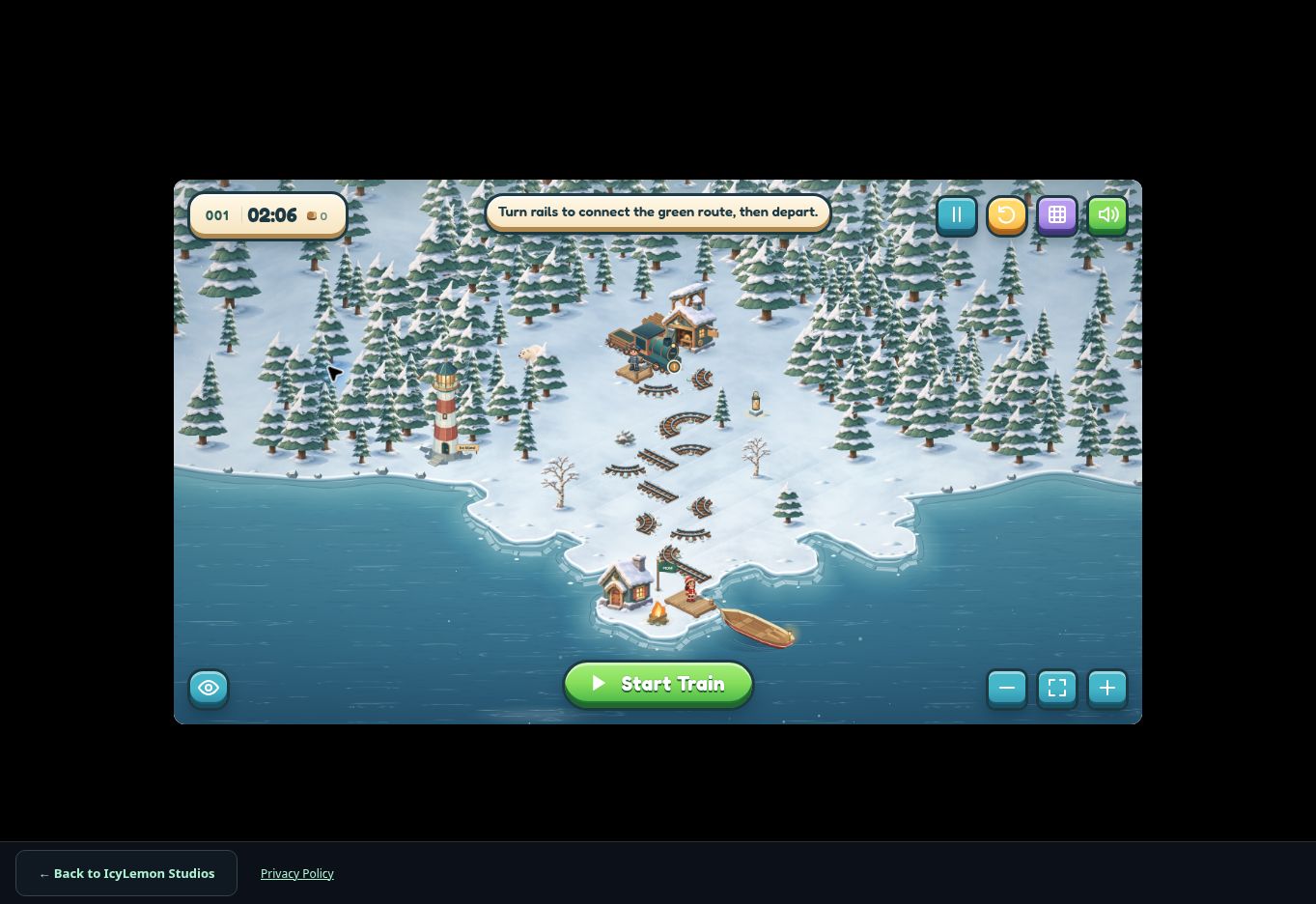
Icebound Express is an original railway puzzle game from IcyLemon Studios. Each delivery starts with track pieces that need to connect. You rotate the movable rails to build a continuous route, check the direction of the line, and then load the firewood before the train departs. The scenery is part of the journey, but the shape of the track is what solves the puzzle.
Story mode contains 100 deliveries. Completing a delivery unlocks the next one, with larger layouts and more route decisions appearing as you progress. After finishing Story mode, 20 Special signal puzzles become available. Special mode builds on the same rail-reading skills, adding signal and gate decisions to the route.
Your first session
How to play
- Pick a delivery. Choose Story from the main menu, then select an unlocked map. Your first delivery is Map 1. Completed maps can be revisited from the level picker.
- Connect the rails. Click or tap a movable track piece to rotate it. Follow the visible route from the engine towards the destination, making sure each rail joins the next. The countdown begins when you start rotating tracks.
- Check before departure. Look at curves and junctions from both directions. Use the zoom and Fit controls to inspect larger islands. The Scenery button hides decorative objects when you need a clearer view of the track.
- Load and deliver. Press Start Train when the line is ready. Captain Joy loads the firewood and follows your route. If the train cannot reach its destination or time runs out, restart the map and try a different arrangement.
Make yourself comfortable
Controls at a glance
| Action | Computer | Touchscreen |
|---|---|---|
| Rotate a rail | Click a movable tile | Tap a movable tile |
| Select and rotate with keys | Arrow keys, then Enter or Space | Use the touch controls |
| Move the view | Drag the play area | Drag the play area |
| Zoom | Mouse wheel or + / − buttons | Pinch or use + / − buttons |
| See the whole island | Fit button | Fit button |
| Pause / restart / maps | Top toolbar buttons | Top toolbar buttons |
Play in a modern browser. Use the game’s sound, graphics and fullscreen controls to find a comfortable setup for your screen.
A better next attempt
Practical tips
- Read the destination first. Find where the train needs to arrive, then trace a possible route back towards the engine. This helps you spot which curves need to turn before you start clicking.
- Use the route preview. After each rotation, inspect the bright rails. A piece can look close to the next track without actually connecting to it.
- Plan before the clock starts. Take a moment to inspect a fresh map before rotating a tile. Once you start changing tracks, keep an eye on the remaining time.
- Make space to see. On a larger map, zoom out or press Fit. If a tree or building makes a junction hard to read, use Scenery to simplify the view rather than guessing.
Between sessions
Progress, ratings and Special mode
The browser edition saves completed deliveries, ratings, the current puzzle and its timer, along with sound and graphics preferences. Return using the same browser and device to continue. The save is local to this website; there is no automatic browser-to-Android transfer.
Complete the full Story route to unlock Special mode. If you choose Special before that point, the game explains that Story must be finished first. Replaying an earlier delivery is a useful way to practise reading curves and switches before tackling a more complicated island.
Good to know
Common questions
Why can’t I rotate every piece?
Some track pieces are fixed parts of the puzzle. Rotate the movable pieces to connect to them. Track editing is for route preparation; once the train departs, follow the delivery or restart to make a new plan.
When does the timer start?
The timer starts when you begin rotating a movable track piece. You can inspect a newly started puzzle before making that first change.
Why is Special mode locked?
Finish all 100 Story deliveries to unlock the 20 Special signal puzzles. Completing an earlier delivery opens the next Story map.
Can I keep my save if I clear browser data?
Clearing this site’s browser storage can remove your local progress. Use the same browser profile to keep playing; private browsing may discard saves when the session ends.
What can I change if the game feels slow?
Open Settings and try a lower graphics quality or turn off snow. Larger maps can also be easier to navigate with Fit and a simpler Scenery view.
Release notes
What’s changed
Added this game overview, controls, practical tips, save guidance and common questions. Play opens the dedicated game view, keeping the guide and gameplay easy to navigate.
The studio website received the Icebound Express 2.1.1 browser build, including its Story campaign and unlockable Special puzzles.